

Are you wondering how to schedule Instagram posts and Stories?
Looking for the best Instagram post scheduler to save time and grow?
We’ve got you covered. By the end of this piece, you’ll know exactly how to visually plan, schedule and automatically post to Instagram.
Read on, I’ll show you how to try out this awesome tool for free, and start making money with Apphi!
I’m sure you’re already aware, growing your Instagram following is not as easy as it seems- it is hard!
After all, you have to create content people love on Instagram, consistently post every day, doing this at the exact optimal time, engage with other users and with your comments.
I used to spend a couple of hours every day on Instagram- login multiple times to post manually throughout the day. Going out there and show my content in front of people’s feeds every single day.
This can easily suck up all your time if you let it.
But the results are incredibly rewarding.
On the bright side, you can turn Instagram into relationships and income.
Instagram has over one BILLION active monthly users, half of them are visiting daily- and they’re looking to buy a product/service or read your content.
Your audience is on Instagram.
As you can see, growing your Instagram without the right tool is an uphill battle.
That’s where Apphi comes into place.
I’ve tried many other popular apps in the past couple of years (Later, Tailwind, Hootsuite) to save time and boost my Instagram presence.
But nothing beats Apphi when it comes to fully automate Instagram publishing.
Let’s look at Apphi in detail and see how it can help you.
What is Apphi?
Apphi is my #1 Instagram scheduling tool andone that I openly promote myself because of the incredible time-saving and sheer value it provides.
Apphi is an all-in-one time-saving tool with powerful features that you need to make the most of your Instagram marketing. Use it to visually plan, bulk schedule posts, automatically post them on your Instagram, track post-performance and measure ROI.
Not only that, you can also use Apphi to schedule Story and multi-image posts, though auto-post is not supported at the moment.
With Apphi, you can plan your content ahead of time and publish it automatically on Instagram – right on your desktop browser. And schedule on the go with the mobile apps – wherever and whenever, you want. No separate notifications!
It’s meant to be used by bloggers, marketers, brands, influencer and agencies.
You can also use it to schedule, manage and auto-post everything to other social networks, including Facebook and Twitter, all in one single app.
Importantly, with the Apphi affiliate program, you can now earn money with just your mobile phone (we will get into this soon- keep reading!).
Why Apphi is the Best Instagram Scheduler?
While there are tons of great Instagram scheduling tools out there, many of them have a lot of restrictions on how and what you can automate. Apphi has no restrictions, you can schedule all types of content – videos, images, carousels, Stories, feed-posts and even Swipe-up links.
*Note: Story and multi-image posts cannot auto post.
What’s more, you can manage unlimited Instagram accounts all at the same time, just like an agency.
Plus, Apphi goes beyond simply auto-posting.
It offers premier and cutting edge features that help you to get the most of your Instagram effort:
- Hashtag Lists: Find the best Hashtags
- Add the First comment: Hide hashtags in the first comment!
- Saved captions: Apphi can auto-apply captions and make sure you won’t have the same caption used in a row
- Bulk schedule everything: Effortlessly plan and bulk schedule up to 3 months of content that will automatically post across all social media platforms, in one batch working session!
Not only it’s a powerful tool to boost your visibility and growth, but also a HUGE time-saver.
Apphi also provides everything you need to schedule your Instagram posts and Stories all in one app:
- Schedule ahead and Instantly post.
- Drag & Drop to rearrange posts
- Fully automate your publishing!
- Tag a location to geo-target followers from a specific area
- Use hashtags to drive more conversations
- Tag the accounts in the post captions to grab attention and increase engagement
- Bulk Stories Uploading with Swipe-Up links
- and much more!
Here’s the good news– You can test out this tool and manage unlimited Instagram, Facebook and Twitter to see if it’s right for you before making a commitment.
All the free users can only get 10 free autopost plus 7 days of free usage on some advanced features.
If you want to have advanced features, it starts at $9/month. (Get 10% OFF here on your First Payment)
How to Grow your Instagram with Apphi (The 80/20 Rule)
Growing an Instagram isn’t about how “cool” or “social” you are, it’s about identifying the tasks that drive the best results and consistently executing them at a high level. I’ll walk you through the whole process…
To start, you’ll need to sign up for Apphi and then connect to your Instagram Business account. Upload your content to your Apphi account and take advantage of Apphi’s awesome features.
1. Visual Planning
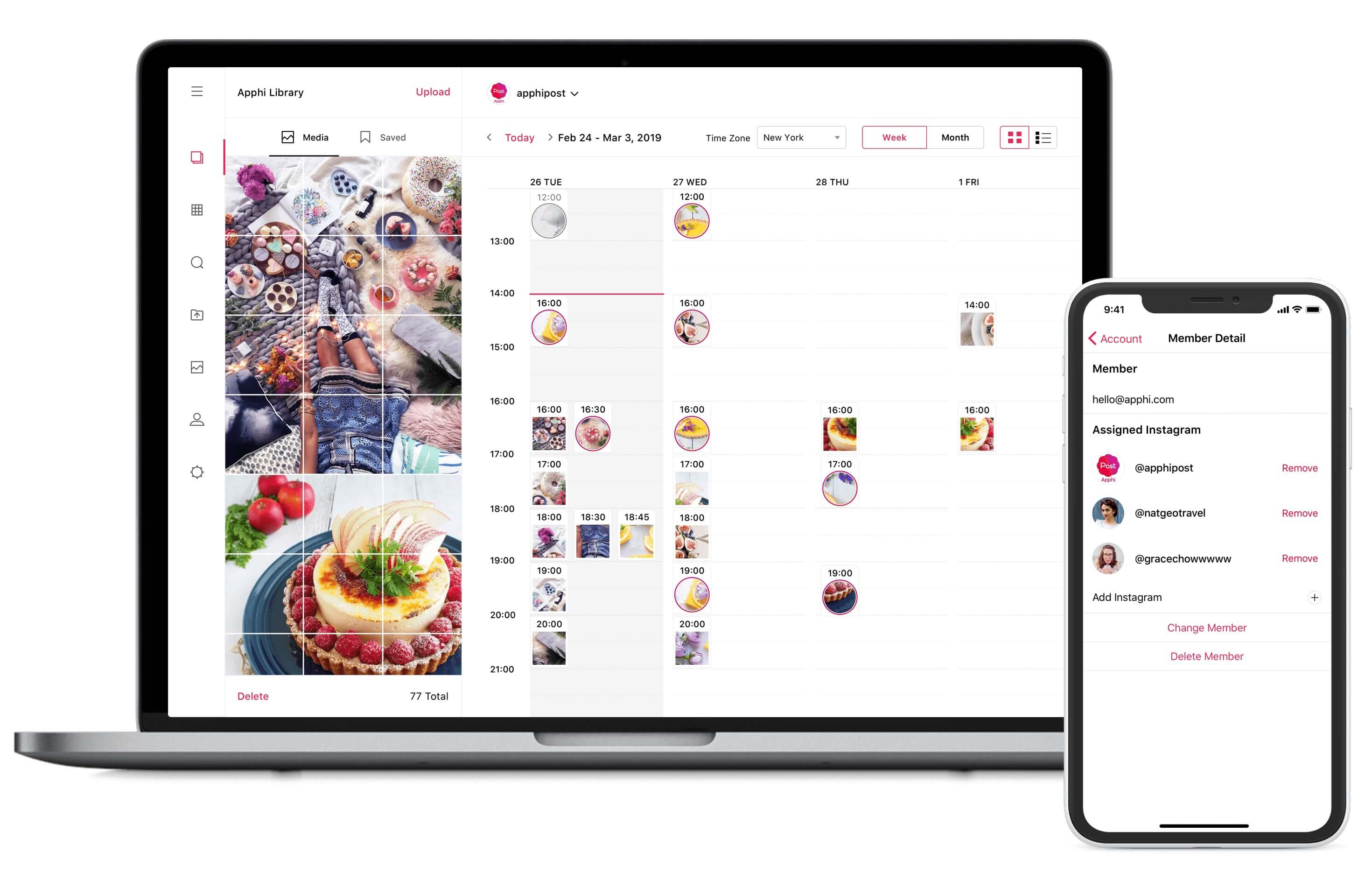
Create a visually-appealing Instagram feed with drag-and-drop scheduling
Instagram is a visual platform, so crafting a visually-appealing Instagram feed is a great way to catch your audience’s attention, converting potential visitors into followers.
Apphi makes Instagram scheduling super easy. There’s no learning curve.
Simply drag and drop to rearrange images of your upcoming post. You can easily see how your feed looks to your followers in Calendar view and give it a creative design before you publish. This differentiates you from the amateurs.
2. Bulk Scheduling Everything
Bulk upload your Instagram content. Let Apphi picks the posting times when your audience is already most engaged to get more engagement out of every post.
You can bulk schedule a maximum of 20 images/photos/videos each time you upload.
Click “Bulk Schedule” and select one of the 3 options:
- Bulk for Post
- Bulk for Story
- Bulk for IGTV
Use the in-app photo editor to add text, filter, stickers, overlays on your pictures. Set the optimal times and schedule your posts with Apphi: they will post automatically – Instagram posts, Facebook posts and Tweets, in the right order, at the best time for maximum engagement!
The only downside is that Stories and carousels cannot auto-post.

3. Automatic Hashtags
Find the perfect hashtags to reach your target audience organically
 Using the right hashtags can increase your reach and engagement significantly. Each hashtag opens new opportunities for people to discover your post, see your profile, and even follow your account if they like your content.
You can add up to 30 hashtags for each Instagram post.
So stop placing random general hashtags that don’t work for you.
Stop using the same old hashtags for every post. You are taking a short cut and saving a lot of effort, but that can get your account shadowbanned by Instagram.
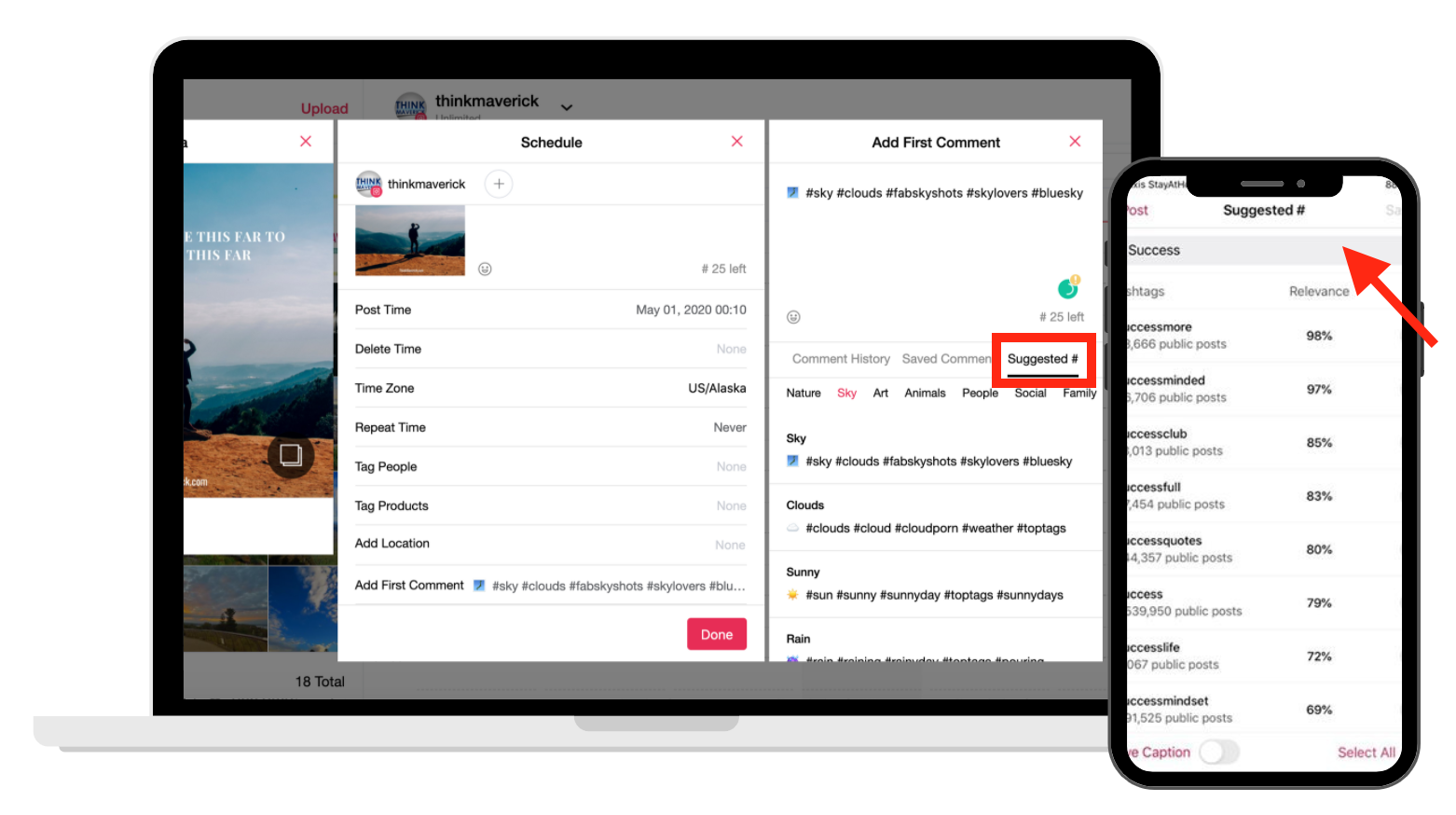
Using the hashtag tool on Apphi, you can explore, find and view each hashtag with the number of uses and relevance score.
This smart feature will help you find new, relevant hashtags. Scroll through the hashtags list, and simply tap on any hashtags you want to include in your post. And it will automatically track how many hashtags you add until you reach the max limit of 30.
4. Hide Hashtags in First Comment
Use “Add First Comment” feature to hide Hashtags on your Instagram posts.
Stop cluttering your captions with hashtags. Instead, tidying up your Instagram feed by hiding hashtags and posting them as your first comment.
To hide your hashtags on your description, simply press “Add First Comment” and Apphi will automatically post your hashtags as your first comment for each post.

5. Saved Hashtags and Captions
Auto-apply captions and have them publish on your Instagram.
This feature is a game-changer. You can save your most used captions and hashtags, as well as your best content for future repost.
Each post you publish earns you a little more time. Your captions and hashtags are conveniently saved so you can access them without repeating yourself over and over again.
6. Schedule Story with Swipe-up link
Drive More Traffic 24/7 with Swipe-up link
500+ million people are using Stories each day, so don’t forget to use Instagram Stories to engage with your audience.
Plan your Story ahead, add a clickable link to your Story and Apphi will automatically post to your Instagram Story without having to lift a finger!
If you have an Instagram Business profile with over 10,000 followers, Apphi allows you to schedule Swipe-up Links!
Simply add the desired URL to your Story when you schedule. And when the Story is live, your audience can swipe up to visit the specific page.
If you have a small account (less than 10,000 followers) and don’t have the “Swipe-Up” option, you can still use Apphi to auto-post your Story and apply this @mention #instahack to drive more traffic to your website. For more information, check out tip #6 on this Instagram Link guide.
7. Repeat Posting
Share evergreen content repeatedly on a set schedule
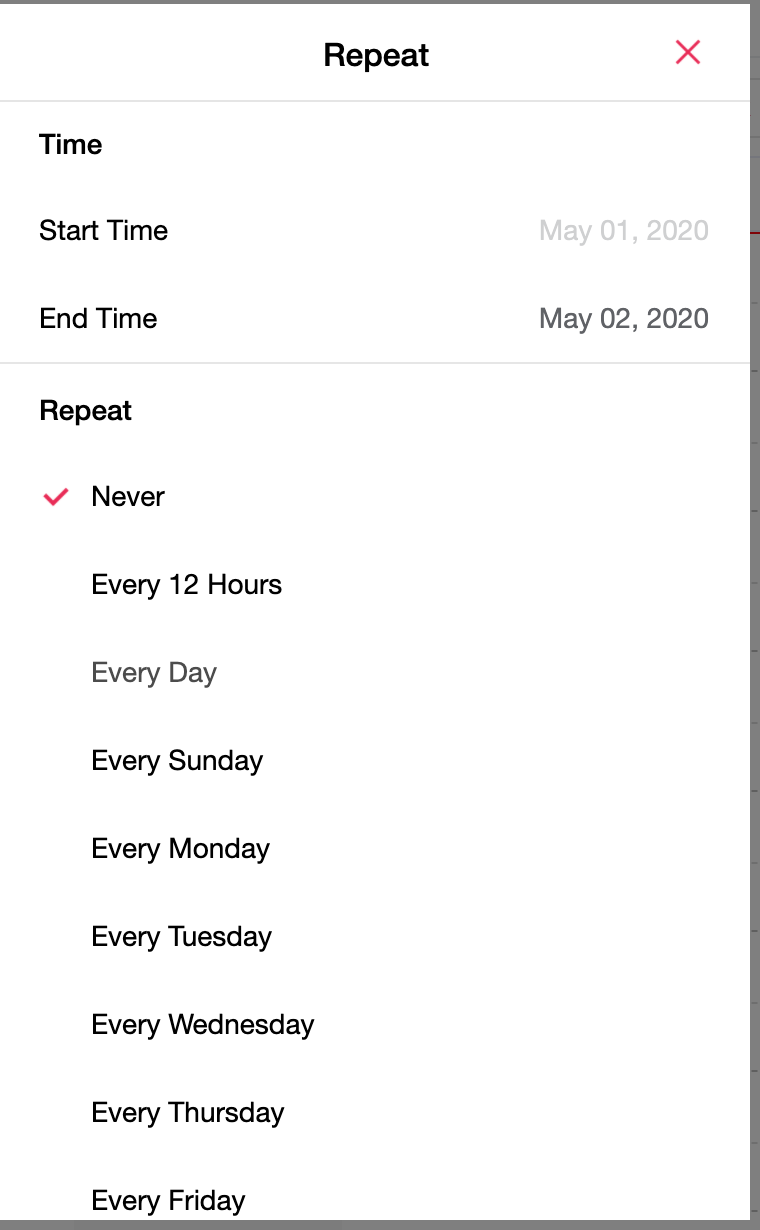
Managing your Instagram content calendar is a breeze. Schedule and automatically repeat your posts at set intervals, once a week, once a month, or any custom schedule, you decide.
This “recycle post” feature is a very handy feature that you can’t find in other popular Instagram scheduling tools on the market.
You can reschedule content for reposting and also set with expiration dates for posts that might be related to a specific event or promotion.
8. Manage Unlimited Instagram accounts
With Apphi, you can manage as many accounts as you want, and access all your Instagram on any devices.
9. Auto Posting
Manage your Instagram in advance from your phone and desktop
Preview, plan and design your Instagram feed, edit your posts, tag relevant users, locations and products, format your caption, schedule post, multiple images, videos and Story all in one place.
Bulk upload images, design your grid layout on a laptop, and use the mobile version to schedule on the go.
Is Apphi really so perfect?
If you ask me, Apphi is a great Instagram scheduling tool but it lacks a few important features:
- Story and multi-image posts cannot auto post.
- Search & Repost and analytics are currently not supported.
It’s FREE!
The best part- You can use all the tools and features for FREE!
Simply download Apphi (available on both desktop and mobile), link it to your Instagram account and start scheduling posts and Stories to free your time!
Its Free version allows you to manage Unlimited Instagram, Facebook, Twitter.
You get 10 free autopost plus 7 days of free usage on some advanced features.
If you want to have advanced features, it starts at $9/month. (Get 10% OFF here on your First Payment)
Is It Worth The Upgrade?
The short answer yes.
As we know, successful businesses take investment.
With Apphi, you can easily create an eye-catching visual grid, bulk schedule and auto-publish your content to Instagram, in just a couple of minutes – all done from the convenience of your computer and smartphone!
You can step away from Instagram (if you need a break or spending more time on your business) without worrying about your social channels, blog or website being stagnant.
BONUS: Make Money with Apphi Affiliate Program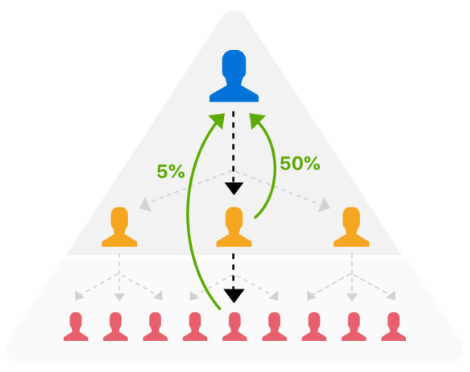
Know someone who’s struggling to grow their Instagram?
Refer them to Apphi and you’ll earn up to 50% commission for every person you refer.
What’s more, your friends get 10% off their first-time payment only through your referral link.
That’s not all. You will also get a commission from the people who get referred by the people you invite too! It’s a great source of passive income!
It’s a win-win-win.
To start earning passive income with Apphi, you have to sign up as a paying member of the platform. You can get the 10% Off signing up through my link here.
Log in to your Apphi account, go to “Earn Money-Affiliate/Referral” section. Here, you’ll get your own unique referral link. Share this link with your friend and start earning.
There is no limit to how many friends you can invite or how much you can earn!
You can expect to earn $9.50 – $180 per sign-up (50% commission only available for PRO accounts).
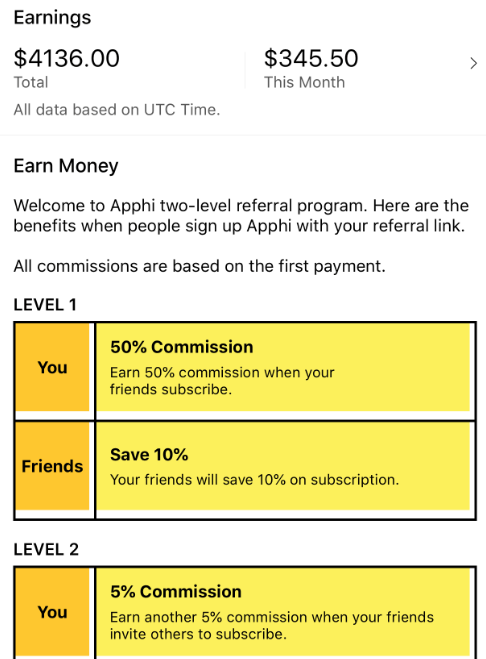
Here’s a screenshot of my earnings with Apphi. Apphi offers the most lucrative referral program to reward its users!
For more information on how to make money with affiliate marketing, visit this article with all my tips.
Conclusion
That’s it. You just learned 80% of the rules of good Instagramming. You’re welcome.
Sharpen your IG arsenal. Take Apphi for a Test Drive. It’s free and you can add unlimited Instagram, Facebook and Twitter to manage. If you want to have advanced features, it starts at $9/month. (Get 10% OFF here on your First Payment)
Happy scheduling!
What do you think of Apphi?
Will you use it to schedule your Instagram post? Why or why not?
Which apps do you use for scheduling Instagram posts? Tell me in the comments!
Related reading:
- 7 Best Time-Saving Instagram Scheduling Tools
- 10 Best Instagram Tools to Help You Get More Followers
- 7 Best Instagram Link In Bio Tools
- 8 Best Apps For Instagram Stories: Level Up Your Visual Content
- 7 Smart Ways to Add Clickable Links on Instagram
- How to Create Custom Instagram Highlight Covers in less than 5 minutes
- How to Add Instagram Highlight Covers Without Posting to Story
- How I grow my Instagram from 0 to 5000 Followers in 5 months
Last but not least, if this post was of any help to you, please share it on Facebook, Twitter and Pinterest!
A quick share from you would seriously help the growth of this blog.
Thank you so much!
I live and breathe making an income online.
I’ll be sharing more ideas and guides soon. Stay tuned.
If you haven’t already, sign up here to receive my emails.


![10 Best Black Friday and Cyber Monday Deals for Small Business [2019] THINKMAVERICK](https://thinkmaverick.com/wp-content/uploads/2019/10/TM-BLACKFRIDAY-DEAL-110x80.png)




Great article